mbox file merge wizard

Jagware
MBOX File Merge Wizard

It is a one-stop solution to merge MBOX files in batch without any hassle or the expert’s need. It has various advanced features, which makes it a quick, easy, and reliable MBOX Merger Tool. The best thing about this MBOX file merger is that it is tried, tested, and recommended by industry professionals who often seek such an automated tool to ease their tasks. Let’s get a quick brief of its most efficient and unique features, which make it a trustworthy MBOX file merge wizard.

(Average Rating 4.8 based on 479 Reviews)

  • This MBOX file merger wizard has dual selection modes for specific output.
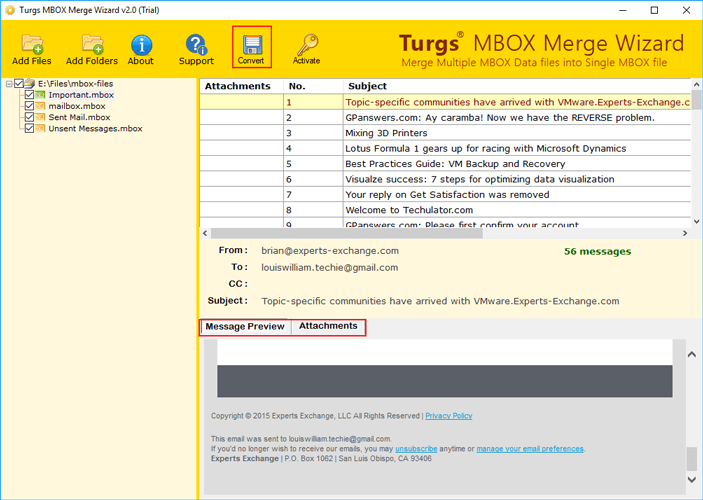
  • It allows users to preview messages and attachments of MBOX files before merging them.
  • It merge MBOX files in bulk with complete accuracy and no obstruction in the process.
  • This MBOX merge program ensures no data loss, alteration, or loss of hierarchy.
  • It is very beginner-friendly to use even for non-tech individuals.
  • This MBOX merge software accepts all MBOX files irrespective of the email client.

Live Free Demo: Download Free Demo Edition to Merge 25 MBOX files from each folder.

selection modes

Has Dual MBOX Data Selection Modes

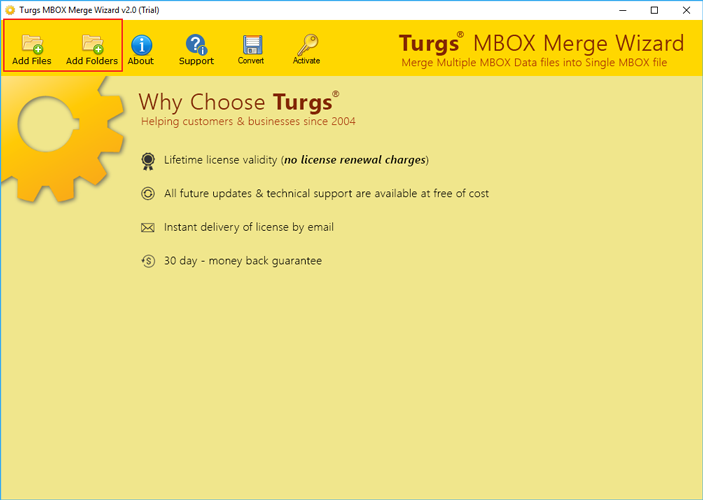
With the Jagware MBOX file merge wizard, users get two separate data selection modes to specifically browse and pick the MBOX files or folders that they want to merge. This helps in generating precise output, which only contains the required data. The two selection modes are:

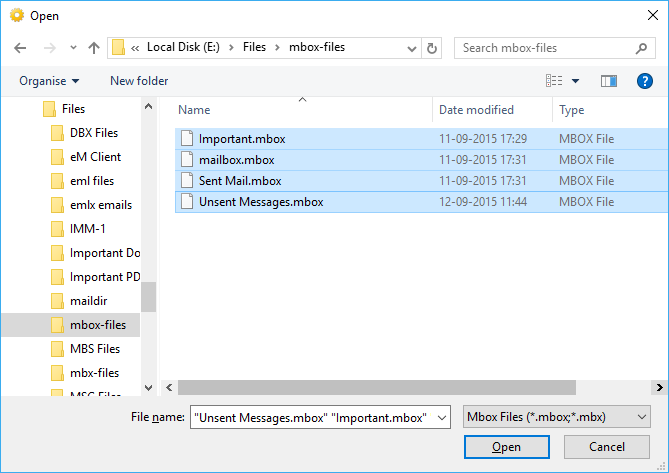
Add Files: This option allows the user to browse and pick multiple MBOX files that are saved on their system. It is often used when the user has a smaller number of .mbox files and knows specifically which ones to merge.

Add Folders: On the other hand, this option lets the user choose the entire folder that contains bulk MBOX files. It basically selects batch data in just one click, so that the user does not need to manually browse and pick particular MBOX files.

support all mbox

MBOX Merger Supports All MBOX Files

One of the other great features of this MBOX merge software is that it supports data from every MBOX-based email client. This feature makes this software versatile and compatible to work with multiple email clients MBOX files and hence, boosts the users productivity.

Therefore, whether the user gets the .mbox files from Thunderbird, Eudora, IncrediMail, The Bat, Entourage, or so on, they can simply merge MBOX files effortlessly using this utility.

Also, to merge MBOX files, there is no need to install or depend on any email client, which makes this tool independent of any external or third-party application.

What Makes Jagware MBOX File Merger Wizard A Reliable Utility?

Have a Quick Glimpse Of The Most Highlighting Features of This MBOX Merge Tool

tech-friendly

Extremely Tech-Friendly to Merge MBOX Files

Keeping the non-tech users in mind, this MBOX merger tool is developed with a very easy-to-understand and use interface. Thus, the user can seamlessly access the options to join MBOX files into one by selecting the dedicated buttons and tabs present there.

independent solution

Completely an Independent MBOX Merger Tool

Another trait that makes this tool stand out from the crowd is that it is independent and does not need the assistance of any external plugin, software, email client, or so on. Therefore, it eliminates users' dependency on other utilities as well as keeping data safe.

maintain data integrity

Maintains Data Integrity Professionally

Using this MBOX file merge wizard not only ensures complete data accuracy and originality throughout the process to merge .mbox files, but also maintains the folder hierarchy by creating a new folder.

expert assistance

Offers Expert Assistance Around the Clock

In case the user gets stuck anywhere in during the process to merge MBOX files, they can connect with the technical support team 24x7 via phone call, email, and text options. They will provide detailed assistance and make sure to resolve the issue.

Prominent Features of MBOX Merge Wizard

Read the below shared amazing features of this utility to bulk merge MBOX files at one go.

data preview

Has Data Preview Option

One of the most advanced features of this MBOX merge tool is that it gives a preview option. Thus, before the process to merge MBOX files, one can have a quick look at the body content and the intact attachment file. This gives an overview of the entire file and helps in taking a well-informed decision to join multiple MBOX files into one.

complete file authenticity

Ensure Complete File Authenticity

This tool supports all the elements of the MBOX files, including metadata, header, footer, attachments, signature, links, multimedia, etc., and makes sure that they remain the same/unaltered even after the merging of MBOX files. This maintains the originality of the files and ensures no data loss even in batch actions of MBOX merging.

saving destination option

Has a Saving Destination Option

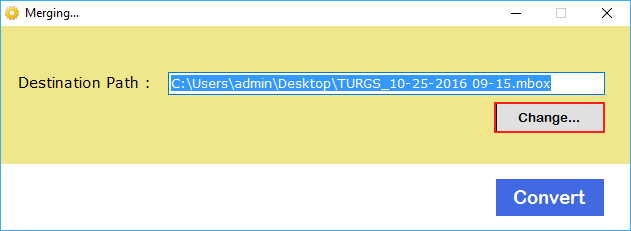
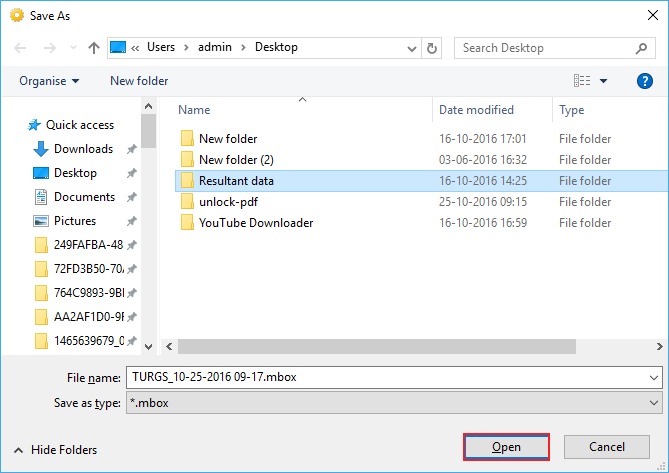
To organize the output data and manage the folder hierarchy, there is a file-saving destination option as well in this MBOX file merge wizard. It allows the user to select the saving location or even create a new folder accordingly. This feature also makes accessing the required data easier and faster, which contributes to user productivity.

merge large mbox files

Merge Large MBOX Files in One Go

This software accepts old and large MBOX files as well, to merge them into one MBOX file. This saves a lot of user's time and other resources, too. Thus, this MBOX file merge wizard reads the entire data present in those files and effortlessly merges them to create one. The best thing is that using the tool prevents data corruption or obstruction happens when working with heavy files.

runs on all os

Runs on All Operating Systems

This MBOX merger software is very compatible, since it runs on all operating systems, including Windows and mac OS. Thus, whether the user has Windows 10, 8, 7, XP, or other versions, they can easily install and merge MBOX files with this software. The same goes for the Mac operating systems, irrespective of the latest versions.

safe and secure

Completely Safe & Secure to Use

Since this software runs in offline mode, it ensures complete data safety and no interference from digital invaders or attackers such as viruses, malware, etc. Also, it makes sure that data elements are disrupted, altered, or lost throughout the process to merge MBOX files, which makes it a safe, secure, and reliable MBOX merger software.

How to Merge MBOX Files in Batch Hassle-Free?

Watch this complete video to learn the working of the Jagware MBOX file merge wizard.

Quick steps to bulk merge MBOX files in one using this tool:

  1. First of all, install and run the MBOX merger.
  2. Now, select the MBOX files using the given selection modes.
  3. Once done, preview the files and hit the Convert button.
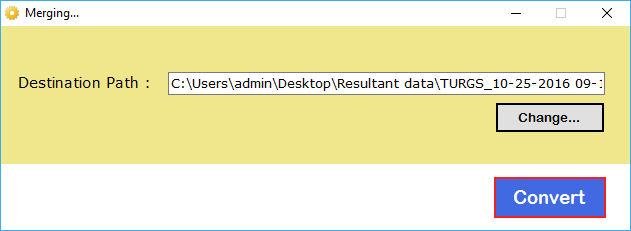
  4. After this, navigate and choose the saving location of the merged MBOX file.
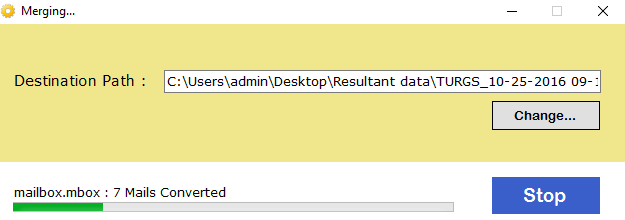
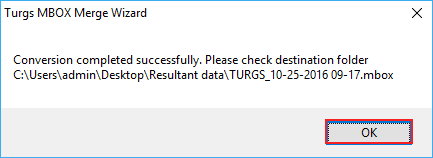
  5. Finally, click the Convert button and see the live process to join MBOX files.

This is how you can merge multiple MBOX files easily, quickly, and efficiently.

Specifications of MBOX File Merger

Let’s get a quick view of all the specifications as well as requirements to run the Jagware MBOX file merge wizard.

Software Download

File Size: 3.91 MB

Version: 2.0

Trial Limitations

In a Demo Edition, it only allows to merge 25 MBOX files from each folder whereas one can purchase the licensed version for no file-size limitation.

System Specifications

Hard Disk Space
Minimum 100 MB Space

RAM
Minimum 2 GB RAM

Processor
Intel® Pentium 2.4 GHz processor

Supported Editions

  • Microsoft Windows – Windows OS 11 (64 bit), 10, 8, 7 (32 bit or 64 bit) & Windows Server 2022, 2019, 2016, 2012 R2, 2008
  • mac OS: Outlook Converter Software is compatible with all editions of mac OS. It supports macOS 12.0 (Monterey), macOS 11.0 (Big Sur), mac OS 10.15 (Catalina), macOS 10.14 (Mojave), macOS 10.13 (High Sierra), macOS 10.12 (Sierra), OS X 10.11(El Capitan), OS X 10.10 (Yosemite), OS X 10.9 (Mavericks), OS X 10.8 (Mountain Lion).

Electronic Delivery

After payment, you'll receive an email with the download link and activation key for the Jagware MBOX File Merge Wizard, with instant access and activation.

Free vs Paid Licenses of MBOX Merger Software

Learn what the freemium edition of MBOX file merger offers and where it limits the user.

  •  
  • Supports All MBOX Files
  • Manage the Hierarchy
  • Dual Selection Modes
  • Data Preview Option
  • Supports Batch Mode
  • Price
  • Free
  • First 25 Items/Folder
  • Free
  •  Download

Frequently Asked Questions

Some most asked queries of the users who want to merge MBOX files professionally.

The term MBOX basically comes from the word “mailbox”. Hence, it is a file extension that stores multiple email data in a file. It is more like a folder that is loaded with email conversations.

With this Jagware MBOX file merger wizard, there is no need to install or depend on any email client or third-party software, or plugin to merge .mbox files in one.

Of course, yes, you can use this software on any operating system, including Windows and Mac. The best thing about it is that it supports even the latest version of the OS so that it user can compatibly install and use it to join MBOX files in a single file.

If the user has a free edition, they can only merge 25 MBOX files from each folder. However, if the user owns the premium license, there are no file size or number limitations at all to merge MBOX files efficiently.
Customer Reviews on Jagware MBOX File Merge Wizard

Get a quick look at what our satisfied and loyal consumers have to say about our MBOX file merger.